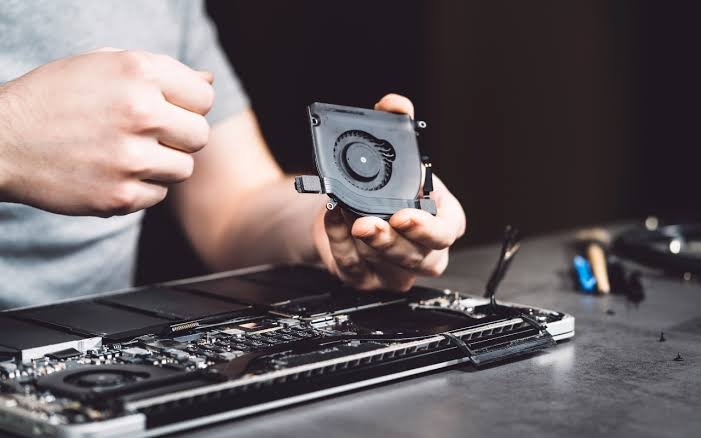
If you’ve ever been working, watching a movie, or playing a game and suddenly wondered, why is my laptop fan so loud, you’re not alone. A noisy laptop fan can be frustrating, distracting, and even concerning. While laptop fans are designed to cool your system, excessive noise often indicates that something isn’t working as efficiently as it should.
The good news is that a loud laptop fan doesn’t always mean your computer is damaged. In many cases, the problem can be fixed with a few simple maintenance steps. This guide explains why is my laptop fan so loud, the most common causes, and practical solutions to help your laptop run quietly again.
Why Do Laptop Fans Make Noise?
Laptop fans help regulate internal temperatures by pushing hot air out of the device. Every time your processor (CPU) or graphics chip (GPU) works harder, it generates heat. The fan automatically spins faster to keep everything cool.
However, if you frequently ask yourself, why is my laptop fan so loud, it usually means your laptop is overheating or working harder than normal.
Understanding the cause is the first step toward fixing the issue.
1. Dust Has Built Up Inside the Laptop
One of the most common answers to why is my laptop fan so loud is dust accumulation.
Over time, dust settles inside the cooling vents and around the fan blades. This blocks airflow, forcing the fan to spin faster and louder to maintain safe temperatures.
Solution
- Clean the air vents using compressed air.
- Remove dust every few months.
- Avoid using your laptop in dusty environments.
Regular cleaning can significantly reduce fan noise.
2. Too Many Programs Are Running
If multiple applications are running at once, your CPU has to work much harder.
Many users searching why is my laptop fan so loud discover that dozens of unnecessary background programs are consuming system resources.
Solution
- Close unused applications.
- Disable unnecessary startup programs.
- Check Task Manager to identify resource-heavy software.
Reducing CPU usage often makes the fan quieter almost immediately.
3. Your Laptop Is Overheating
Overheating is another major reason behind the question why is my laptop fan so loud.
Heat can build up if ventilation is poor or if you’re performing demanding tasks like:
- Video editing
- Gaming
- Programming
- Rendering 3D graphics
The hotter your laptop becomes, the faster the cooling fan spins.
Solution
Always place your laptop on a hard, flat surface instead of:
- Beds
- Blankets
- Pillows
- Sofas
Soft surfaces block airflow and trap heat.
4. High CPU Usage
Sometimes a single application consumes nearly 100% of your processor.
If you’re repeatedly wondering why is my laptop fan so loud, open Task Manager and look for applications using excessive CPU power.
Examples include:
- Antivirus scans
- Browser tabs
- Video editing software
- Malware
Closing or updating these programs often solves the issue.
5. Malware or Viruses
Hidden malware can secretly use your laptop’s processing power.
This causes continuous CPU activity, making users ask why is my laptop fan so loud even when the laptop appears idle.
Solution
Run a full system scan using trusted antivirus software.
Remove any detected threats and restart your computer.
6. Old Thermal Paste
Inside every laptop, thermal paste helps transfer heat from the processor to the cooling system.
As laptops age, this paste dries out and becomes less effective.
Poor heat transfer means the fan has to work much harder.
If your older laptop makes you ask why is my laptop fan so loud, replacing thermal paste may solve the problem.
This task is usually best handled by an experienced technician.
7. Heavy Gaming
Modern games demand significant CPU and GPU performance.
When gaming, it’s perfectly normal for users to wonder why is my laptop fan so loud because gaming generates much more heat than normal office work.
Solution
- Lower graphics settings.
- Limit frame rates.
- Use a cooling pad.
- Keep drivers updated.
Gaming laptops are specifically designed to handle louder cooling systems.
8. Outdated BIOS or Drivers
Manufacturers often release BIOS updates that improve fan control.
Sometimes the answer to why is my laptop fan so loud is simply outdated firmware.
Solution
Visit your laptop manufacturer’s website and install:
- BIOS updates
- Chipset drivers
- Graphics drivers
Updated software often improves thermal management.
9. Fan Damage
Fans wear out over time.
A damaged fan may produce:
- Grinding sounds
- Clicking noises
- Rattling
- Buzzing
If your fan sounds mechanical rather than just loud airflow, the answer to why is my laptop fan so loud may be a failing cooling fan.
Replacing the fan usually fixes the issue.
10. Poor Ventilation Around the Laptop
Many users unknowingly block the cooling vents.
Even placing a laptop close to a wall or inside a backpack while running can restrict airflow.
If you continue asking why is my laptop fan so loud, ensure there’s enough space around the vents.
Proper airflow keeps internal temperatures much lower.
How to Make Your Laptop Fan Quieter
Here are several effective ways to reduce fan noise:
- Clean dust regularly.
- Close unnecessary programs.
- Keep your operating system updated.
- Scan for viruses.
- Use a laptop cooling pad.
- Avoid blocking ventilation.
- Lower screen brightness when possible.
- Reduce gaming graphics settings.
- Replace worn-out fans if necessary.
These simple habits can extend your laptop’s lifespan while reducing noise.
When Should You Be Concerned?
Occasional fan noise is completely normal.
However, seek professional repair if:
- The fan makes grinding or clicking sounds.
- Your laptop shuts down unexpectedly.
- The keyboard becomes extremely hot.
- Performance suddenly drops.
- The fan never slows down, even when idle.
These symptoms may indicate hardware problems requiring attention.
Can You Turn Off the Laptop Fan?
Some people searching why is my laptop fan so loud wonder whether they can simply disable the fan.
This is not recommended.
The cooling fan protects sensitive components from overheating. Turning it off can permanently damage your processor, graphics chip, motherboard, or battery.
Instead of disabling the fan, focus on reducing the causes of excessive heat.
Preventing Loud Laptop Fans in the Future
Preventive maintenance is the best long-term solution.
Follow these tips:
- Clean your laptop every 3–6 months.
- Keep software updated.
- Avoid using the laptop on soft surfaces.
- Shut down unnecessary programs.
- Perform regular antivirus scans.
- Store the laptop in a clean environment.
- Replace aging thermal paste every few years if needed.
These habits help maintain efficient cooling and quieter operation.
Final Thoughts
If you’ve been asking why is my laptop fan so loud, remember that the fan is usually doing exactly what it’s designed to do—protect your laptop from overheating. Loud fan noise is often caused by dust, high CPU usage, heavy applications, poor ventilation, or aging hardware.
Fortunately, most issues can be resolved through routine cleaning, better airflow, software optimization, and regular maintenance. By identifying the root cause early, you can restore quieter performance and help your laptop last longer.
The next time you hear your laptop getting noisy, don’t panic. Instead, use the tips in this guide to diagnose the problem and enjoy a cooler, quieter, and more reliable computing experience.